
Overview (Designer's Guide)
What is a theme
A theme is a collection of property settings that allow you to define the look of pages and controls and then apply the look consistently across pages in a Web application, across an entire Web application, or all Web applications on a server.
Themes are made up of a set of elements: skins, cascading style sheets (CSS), images, and other resources. At a minimum, a theme will contain skins. Themes are defined in special directories on your Web site or your Web server.
A theme can also include a cascading style sheet (.CSS file). When you put a .CSS file in the theme folder, the style sheet is applied automatically as part of the theme. You define a style sheet using the file name extension .CSS in the theme folder. (Source: msdn.microsoft.com)
Definition of a nopCommerce theme
A nopCommerce theme is used for having a consistent layout and appearance across all pages or an entire website. nopCommerce theme consists of several supporting files, including style sheets for page appearance and supporting images.
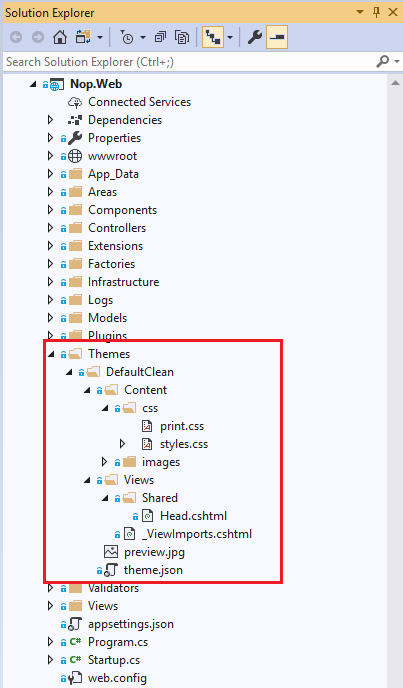
Location of theme(s) in nopCommerce: All themes are located under [nopCommerce root folder]/Themes/.


